SELF-PACED WORKSHOP
Mechanism and control timing
Separate shells, joints, actuators, and sensors, then see how they form a controllable robot.
From assembly to components
Microduck is a small biped. Its legs support and move the body, the neck directs its view, and the trunk houses computing, power, and connections. Visual meshes describe appearance. Joints and collision geometry describe permitted motion and contact. These play different roles in simulation.
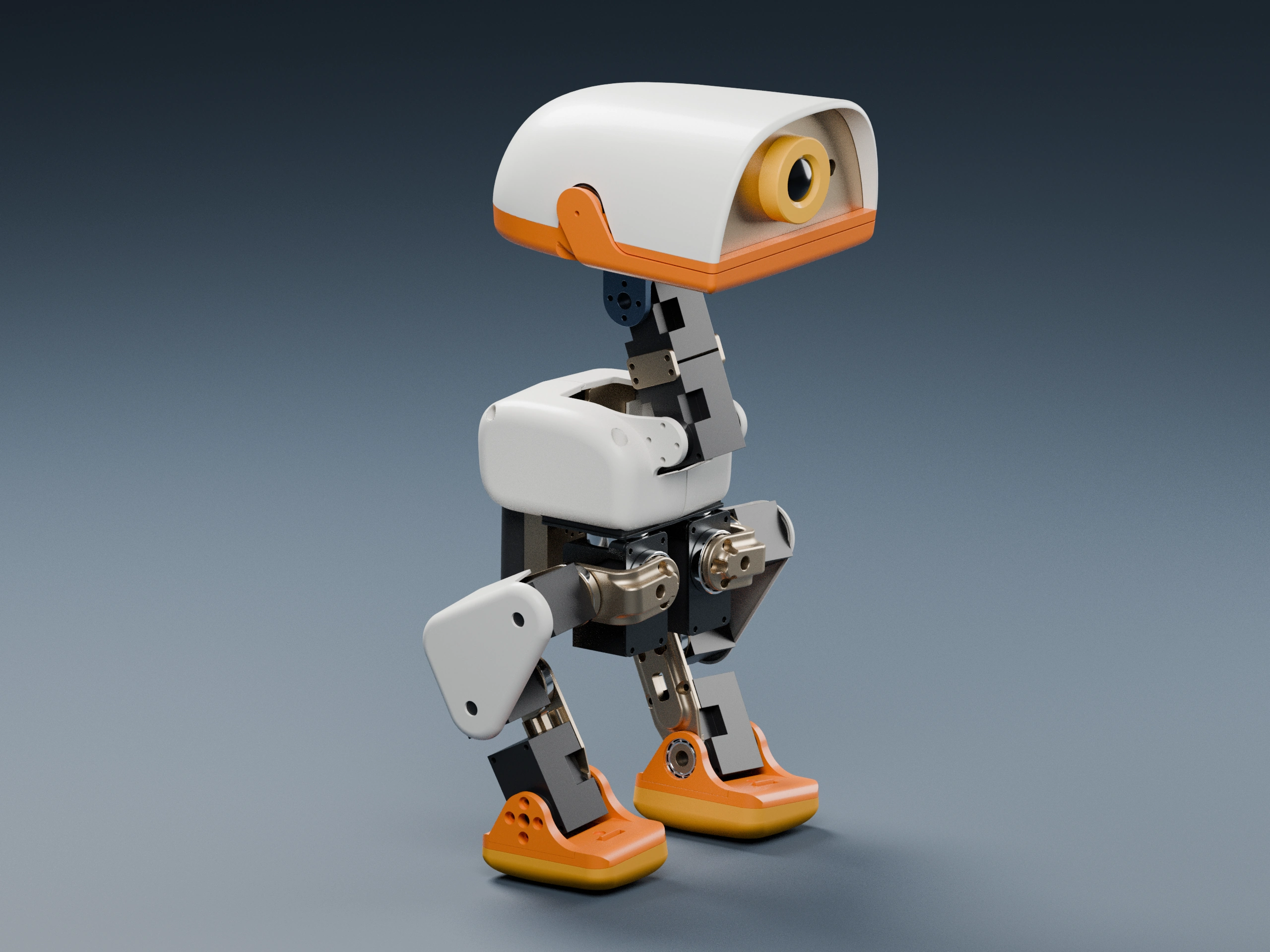
Left-drag to orbit, middle-drag to pan, scroll or pinch to zoom. Use the slider to separate the parts.
Move the separation slider to inspect the leg and head servos. Click their labels to identify the driven joints, then inspect the camera, controller board and battery. Reset to trace the leg joints.
Parts, joints, and degrees of freedom
A pen held at its tip can rotate in several directions, while a hinge normally rotates around one fixed axis. Robot joints impose similar constraints. A degree of freedom is an independent variable needed to describe permitted motion; a component count describes physical pieces. The 70 components in this viewer do not imply 70 policy actions.
| Region | Active joints | Main role |
|---|---|---|
| Each leg | Hip yaw, roll, pitch; knee; ankle: 5 joints | Support the body and place the foot |
| Neck and head | Neck pitch; head pitch, yaw, roll: 4 joints | Orient the camera and head |
| Beak | Physical servo; not controlled by this policy | Shown in 3D model, excluded from the 14-action interface |
Select a hip servo and inspect its output shaft and nearby bearing. The servo controls an active angle, the bearing supports rotation, and brackets connect adjacent joints. Material, shape, and assembly clearance affect motion. The viewer preserves 3D model detail but does not simulate screw preload, plastic elasticity, or cable forces; it is an anatomy aid rather than manufacturing documentation.
How software moves the mechanism
- 1Policy action
- 2Joint targets
- 3Actuator torque
- 4Physics update
- 5New observation
A policy does not teleport the robot to a desired position. It outputs actions that become joint targets. Actuators produce torque based on the difference between target and measured state. The resulting motion depends on contact, gravity, inertia, and friction.
The policy runs at 50 Hz and physics at 200 Hz: each action spans four physics steps. Backlash introduces passive joints representing transmission play. Passive joints are not additional policy outputs.
Describe motion with frames
| Frame | What is expressed here |
|---|---|
| World | Pitch, goal, and overall robot position |
| Body | Forward, lateral, and turn commands; ball relative to the robot |
| Camera | Image rays and detected target directions |
| Joint-local | A joint’s axis and angle |
Check your understanding
If the head joints stay fixed, is the camera image necessarily stable?
Show explanation
No. Body pitch and roll move the neck and camera. Image stability depends on camera orientation relative to the world, not only on joint angles.
Exercise: trace one load path
Start with the assembled model. Trace a path from the left foot through the ankle, shin, knee, thigh, and hip. Ground support reaches the body through this chain. Explode the assembly and select the servos and brackets around a joint. Identify the fixed housing and the part driven by its output. Explosion offsets are display positions, not physically reachable joint poses.
A servo combines a motor, reduction gears, position feedback, and control electronics. Reaching a target takes time and is limited by torque, speed, friction, and backlash. A policy issuing an angle does not mean the joint instantly reaches it. Chapter 2 observes this difference; Chapter 3 explains how a policy learns around it.
Check your understanding
Does moving the foot farther out in the exploded view change the simulated leg length?
Show explanation
No. The web view explains components. Robot description files define simulated dimensions and joint connections.
What the policy receives and produces
Chapter 1 runs inference with a trained policy. It maps the current observation to 14 joint actions without updating neural-network parameters. Changing the velocity command tests the same model under a different request; it is not training. Choosing a different model file changes the policy.
| Observation, in interface order | Width | What it tells the policy |
|---|---|---|
| Angular velocity and projected gravity | 6 | Body rotation and tilt |
| Relative joint positions | 14 | Pose relative to the nominal posture |
| Joint velocities | 14 | Motion at each joint |
| Previous action | 14 | Previous control output and temporal context |
| Velocity, head, and body commands | 3 + 4 + 6 | Requested behavior |
These values total 61. Reordering joints breaks their meaning even if the input still has 61 entries: the policy might read a knee as a hip. Course entry points preserve ordering, nominal posture, and control timing. Begin by changing commands, duration, and output directories; modify observation construction only after understanding the interface.